
Two-factor authentication: how it enhances your company’s security

Digital security is no longer a concern exclusive to large companies. Today, businesses of all sizes use emails, corporate systems, cloud storage, financial platforms, social networks, and various other tools that store important information. Therefore, relying solely on a password is no longer enough. Even a strong password can end up exposed in a data breach, be reused on other services, or fall into the hands of criminals through phishing scams. In this scenario, two-factor authentication has become one of the most important measures to increase the protection of corporate accounts. What is two-factor authentication? Two-factor authentication, also known as 2FA, adds an extra step to the process of accessing an account. Instead of just providing a username and password, the user also needs to confirm their identity in a second way. This additional validation can occur through different methods, such as: In practice, this means that even if a criminal discovers a user’s password, they will still need to overcome a second layer of protection to access the account. Therefore, 2FA significantly reduces the risk of a compromised credential resulting in a breach. Why is a password alone no longer enough? Passwords remain important. However, criminals have various ways of obtaining them. One of the most common is phishing. In this type of scam, the criminal tricks the user into entering their credentials on a fake page that mimics a legitimate service. In addition, other risks can also compromise passwords, such as: When a company uses only a password as a security barrier, any of these situations can pave the way for unauthorized access. On the other hand, with two-factor authentication enabled, the password is no longer the only element required to access the account. How does two-factor authentication increase security? The main benefit of 2FA lies in the additional difficulty it creates for those attempting to access an account improperly. Imagine, for example, that an employee falls victim to a phishing scam and enters their password on a fake website. Without a second layer of authentication, the attacker can try to use those credentials immediately. With 2FA enabled, however, the system will also require additional confirmation. Therefore, even if the criminal has the password, they will still encounter another obstacle before they can access the account. This small change to the login process can prevent much bigger problems. Which company accounts should use 2FA? Whenever a platform offers two-factor authentication, it’s worth evaluating whether to activate it. Some accounts, however, should be given priority. Corporate emails Email is often one of the most important accounts within a company. In addition to centralizing business information, it also often allows for the recovery of passwords from other systems. Therefore, if a criminal manages to access an email account, they may try to compromise several other services. In this sense, protecting corporate email with a second authentication step is an essential measure. Microsoft 365 e Google Workspace Environments like Microsoft 365 and Google Workspace centralize emails, files, documents, calendars, and shared information. Consequently, an intrusion into these platforms can have significant impacts on the company. For this reason, the use of two-factor authentication in these environments should be part of security policies. Administrative and financial systems ERPs, financial systems, banking platforms, and management tools store sensitive information and often enable important operations. Therefore, these accounts require high levels of protection. Whenever the system offers support for the feature, the company should consider 2FA a priority. Corporate social networks Instagram, Facebook, LinkedIn, and other social media accounts also attract criminals. An intrusion can cause loss of access, publication of inappropriate content, and even scams against customers and followers. Furthermore, compromising these accounts could damage the company’s reputation. Therefore, it is also important to enable two-factor authentication on corporate social networks. Cloud storage services Cloud storage platforms can contain documents, contracts, shared files, and even backups. Therefore, protecting these accounts with additional authentication helps reduce the risk of unauthorized access to important information. SMS, authenticator app, or security key? There are different methods of two-factor authentication, and naturally, each offers a different level of protection. The code sent via SMS continues to be widely used and represents an important additional layer of protection compared to using only a password. However, authenticator apps often offer a more secure alternative, as they generate codes directly on the device and do not depend on the carrier’s network. In addition, companies can also use physical security keys for more critical accounts. These keys typically offer even greater protection and make particular sense for administrators, managers, and users with privileged access. Therefore, the ideal method depends on the structure, risk level, and needs of each company. Are 2FA and MFA the same thing? The concepts are similar, but there is a slight difference. 2FA stands for two-factor authentication and uses exactly two forms of confirmation. MFA, in turn, stands for multifactor authentication and can use two or more forms of validation. Despite this difference, both follow the same principle: requiring more than one piece of evidence to confirm the user’s identity. In practice, companies can use both concepts within their security strategies. Two-factor authentication (2FA) does not replace other security measures. Although two-factor authentication greatly increases account security, it should not be used in isolation. A good security strategy also needs to include other measures, such as: In addition, the company should periodically review its security settings. This is because new threats are constantly emerging, and at the same time, the internal structure is also changing with new hires, departures, new systems, and shifts in responsibility. Therefore, digital security should be treated as an ongoing process. 📌 READ ALSO: Why investing in digital security and antivirus software is essential for any company Special attention should be given to users with administrative privileges. Administrative accounts deserve an even higher level of protection. These users can change settings, create accounts, modify permissions, and access critical information. Consequently, a compromised administrative account can have a much greater impact than a
How to identify a phishing email before it’s too late
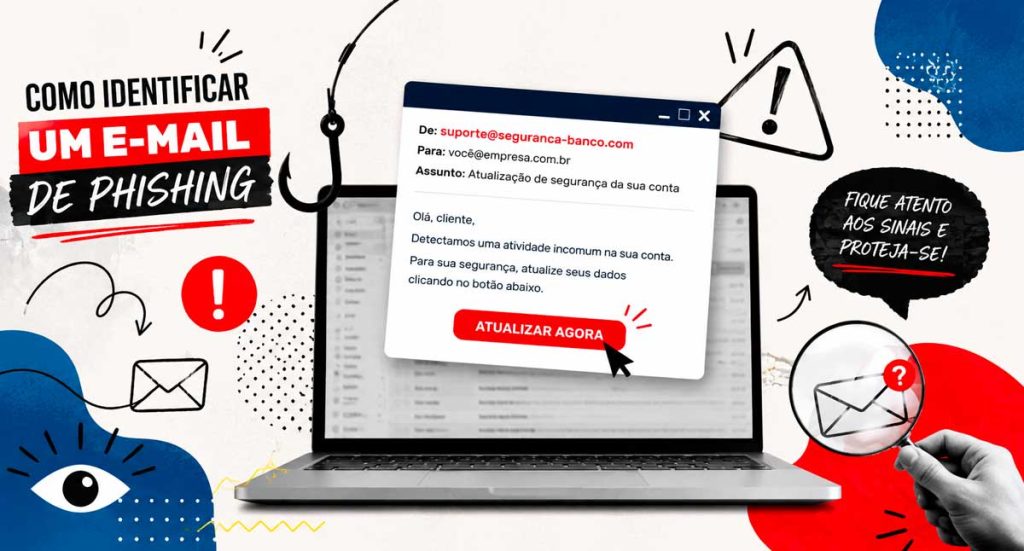
Every day, thousands of companies are targeted by online scams that begin in a seemingly harmless way: a simple email. In many cases, the message appears legitimate, uses the logo of a well-known company, and requests only a quick action. However, just one click is enough for confidential information to be compromised. Therefore, knowing How to identify a phishing email It has become an indispensable skill for employees, managers, and IT professionals. In addition to preventing financial losses, this knowledge helps protect strategic data and ensures greater business continuity. In this article, you will understand what phishing is, learn about the main warning signs, and discover how to significantly reduce the risks of this type of attack. What is phishing? Phishing is a technique used by criminals to deceive people and obtain confidential information. Typically, the attack occurs through fake emails that mimic communications from banks, suppliers, government agencies, well-known companies, or even colleagues. The objective can vary. In some cases, criminals try to steal passwords and banking data. In others, they seek to install malicious programs on victims’ computers. Furthermore, many attacks aim to capture login credentials for corporate systems or cloud services. Therefore, even a seemingly simple message can represent a significant risk for the company. Why does phishing remain so effective? Although security solutions have evolved considerably, criminals have also refined their strategies. Nowadays, many fraudulent emails have an extremely professional appearance. Furthermore, they use genuine logos, convincing signatures, and well-written text. In some cases, the criminals even research public information on social media to personalize the message and increase the credibility of the scam. As a result, identifying a fake email has become more difficult than it was a few years ago. 8 signs that help identify a phishing email 1. Carefully check the sender’s address. The name displayed in the email may seem correct. However, the email address often reveals the fraud. For example: ✔ financeiro@empresa.com.br ✖ financeiro@empresa-suporte.net Therefore, always check the full address before trusting the message. 2. Be wary of messages that create a sense of urgency. Criminals know that people under pressure make decisions faster. Therefore, they use phrases like: Whenever there is pressure to act quickly, pause and verify the authenticity of the message. 3. Check for spelling and formatting errors. Although many scams are well-crafted, it’s still common to find grammatical errors, automatic translations, words out of context, or strange formatting. In addition, different fonts, misaligned images, and low-quality logos can also indicate an attempt at fraud. 4. Analyze the links before clicking. Never click directly on links sent via email without verifying the destination address. Before taking any action, hover your mouse over the link and check the displayed domain. For example: Text presented: www.seubanco.com.br True destiny: seguranca-login-banco.xyz This way, you can identify many scams even before accessing the page. 5. Never share confidential information via email. Reputable companies rarely ask for this: If you receive such a request, stop the process immediately and confirm the information through official channels. 📌 READ ALSO: Why investing in digital security and antivirus software is essential for any company 6. Be careful with unexpected attachments. Attached files may contain viruses or other malicious programs. Formats that deserve more attention include: However, even PDF files can be used in phishing campaigns. Therefore, only open attachments when you are certain of their origin. 7. Be wary of generic greetings. Messages that begin with expressions such as: They may indicate bulk shipments. Although this doesn’t confirm fraud, it’s worth paying closer attention when other signs are also present. 8. Confirm changes to bank details. A fairly common scam involves sending new bank details for payment to suppliers. In this case, criminals often hack into a legitimate email account or create addresses that are very similar to the real ones. Therefore, before changing any financial information, confirm the request by phone or through another official channel. This way, you significantly reduce the risk of losses. What should you do if you receive a suspicious email? If you receive a message that appears to be phishing, remain calm. Right away: Furthermore, if you have any doubts, contact the company that supposedly sent the email directly. How to protect your company against phishing attacks. Prevention depends on a combination of technology, processes, and employee awareness. Among the main measures are: When these practices are adopted together, the company significantly reduces its exposure to threats. What is the role of the IT team? The IT team plays a key role in preventing attacks. In addition to continuously monitoring the corporate environment, these professionals are responsible for configuring security filters, updating systems, blocking malicious domains, and guiding users on best practices. Similarly, a specialized company can identify vulnerabilities before they are exploited by criminals. Consequently, the organization gains more security, reduces operational risks, and improves its ability to respond to incidents. Conclusion Phishing attacks are becoming increasingly sophisticated. However, most of them can be prevented when employees receive adequate training and the company invests in a consistent information security strategy. More than just installing protection tools, it’s essential to develop a culture of prevention. After all, a single click on a malicious email can compromise strategic information, disrupt operations, and cause financial losses. Therefore, investing in technology, continuous monitoring, and team awareness is one of the smartest decisions any organization can make. If your company wants to strengthen its digital security and reduce the risk of cyberattacks, rely on experts who combine experience, processes, and modern solutions to protect your IT environment. Talk to BHead BHead offers complete solutions in IT support, information security, environment monitoring, infrastructure, and protection against digital threats. Get in touch and discover how we can help your company operate with greater security, availability, and peace of mind. 📱 WhatsApp: (11) 4210-1774
System crashes: how much does this cost your company?

Taking a few minutes to stop work might seem like a common occurrence in a company’s daily routine. However, when that pause is caused by a system outage, the impact goes far beyond a simple delay. Many companies still treat this type of problem as an isolated incident. However, in practice, recurring outages represent lost productivity, financial losses, and even operational risks. Therefore, understanding the true cost of these interruptions is essential for any manager. Why do system crashes happen? Before discussing losses, it’s important to understand the root of the problem. After all, systems don’t stop working by accident. In most cases, outages are related to failures in the IT infrastructure. Furthermore, a lack of monitoring and preventative maintenance directly contributes to this situation. Among the main reasons, we can highlight: In other words, it’s not a matter of bad luck. In fact, it’s a consequence of an IT department that isn’t prepared to support the operation. 📌 READ ALSO: BHead: who we are and how we help companies evolve with technology The invisible cost of bus stops. At first glance, a 10 or 15 minute stoppage may seem irrelevant. However, when we analyze the real impact, the scenario changes completely. When the system crashes, entire teams are brought to a standstill. Furthermore, even after the system is restored, there is a recovery period before everyone gets back into their normal rhythm. As a result, overall productivity is affected. At the same time, many ongoing activities may be lost. As a result, tasks need to be redone, which generates rework and increases the team’s effort. Furthermore, customer service is also directly impacted. If the system is down, response time increases and the customer experience is impaired. Consequently, this can lead to dissatisfaction and even lost opportunities. On the other hand, companies that rely on billing systems can suffer immediate losses. In other words, every minute of downtime can represent lost money. The cumulative effect over time Even a single fall can have an impact. However, the real problem lies in its recurrence. When these interruptions happen several times a month, the damage becomes significant. Furthermore, team burnout increases and the work environment becomes more stressful. Over time, the efficiency of the operation decreases. Therefore, what seemed like a small problem begins to affect the overall performance of the company. How to calculate the real impact on your company. Although many companies don’t do this calculation, it’s simpler than it seems. First, consider how many people are impacted by the outage, how long the system is unavailable, and the average hourly cost per employee. With this data, it’s already possible to have an initial estimate of the losses. Furthermore, it’s important to consider factors such as lost sales, rework, and impact on customer service. In this way, the manager begins to see IT as a strategic element, and not just as a cost. What can be done to prevent system crashes? The good news is that this type of problem can be avoided with proper planning. With continuous monitoring, for example, it is possible to identify failures before they cause an impact. Thus, the action ceases to be reactive and becomes preventive. Furthermore, investing in adequate infrastructure is fundamental. Systems need a solid foundation to function correctly, especially in high-demand environments. Another important point is the constant updating of systems. Outdated environments are more vulnerable and therefore more prone to failures. Similarly, information security should be treated as a priority. After all, attacks and security breaches can also cause downtime. Finally, capacity planning ensures that IT keeps pace with the company’s growth, preventing overloads and instability. The difference between solving and preventing Many companies still operate reactively, meaning they only address the problem after it has already occurred. On the other hand, companies that adopt a preventative approach are able to avoid most failures. Furthermore, they gain greater stability, predictability, and operational efficiency. Therefore, the difference lies not only in the technology used, but in how IT is managed. When to seek expert help In many cases, the internal team is unable to handle all the demands. This happens mainly due to a lack of time or specialization. In this scenario, having a specialized partner allows for continuous monitoring of the environment, rapid response to incidents, and better structuring of IT management. Furthermore, the company gains a more strategic view of technology, reducing errors and improving operational performance. If your company is already experiencing system outages or wants to avoid this type of problem, it’s worth rethinking how your IT is being managed. 📲 Talk to BHead on WhatsApp: (11) 4210-1774 and understand how we can help your operation achieve greater stability, security, and efficiency.
How network outages directly impact business productivity.

Network infrastructure is one of the cornerstones of any modern company’s operation. Currently, virtually all corporate processes depend on systems, digital communication, and constant access to data. However, many organizations still underestimate the impact that network failures can have on team productivity. When a corporate network experiences instability, even minor issues, the result is usually lost time, process delays, and employee frustration. Consequently, the company’s operational efficiency is directly affected. Why is the corporate network so important for businesses? Today, most business activities depend on connectivity. Management systems, communication platforms, cloud storage, and collaborative tools require constant and stable network access. Therefore, any interruption can generate chain reactions. For example, when the network becomes slow or unstable, simple tasks take much longer to complete. Furthermore, employees end up frequently interrupting their work to try and resolve technical problems. Over time, these small delays accumulate and have a significant impact on productivity. The main problems caused by network failures. Network failures can occur for various reasons, such as inadequate infrastructure, outdated equipment, or lack of continuous monitoring. Regardless of the cause, the effects tend to be similar. Among the most common problems are: Furthermore, when the network experiences frequent instability, IT departments end up spending a significant amount of time resolving emergency problems instead of working on structural improvements. 📌 READ ALSO:BHead: How computer network management impacts business performance. The impact of network outages on productivity. When network infrastructure is not properly planned, the company begins to face productivity losses that are often not immediately apparent. For example, imagine a team of ten employees who experience only five minutes of system slowdown throughout the day. While that may seem like a small amount, by the end of the week the lost time becomes significant. Furthermore, network problems can directly affect customer service, delay deliveries, and compromise the efficiency of internal processes. For this reason, many companies have come to see network infrastructure as a strategic factor in business performance. The importance of monitoring and managing network infrastructure. An efficient corporate network depends not only on modern equipment. In fact, it requires planning, constant monitoring, and proper management of the IT infrastructure. With proper monitoring, it’s possible to identify problems before they even impact users. This allows the IT team to act proactively, preventing interruptions and ensuring greater operational stability. Companies that have a structured technology management system, such as that offered by BHead IT Solutions They are able to reduce failures and keep their network environments running in a more stable and secure manner. Network infrastructure plays a fundamental role in business performance. When well-planned and monitored, it contributes to more efficient and productive operations. On the other hand, frequent failures can lead to delays, rework, and financial impacts. Therefore, investing in the proper management of the corporate network is no longer just a technical issue, but a strategic decision for companies that want to grow sustainably.
IT Audit: How to Prepare Your Company

Preparing the company for an IT audit is an essential step to ensure security, compliance, and operational stability. HoweverHowever, many organizations still view this process merely as a one-off obligation.In practiceHowever, auditing should be part of routine technology management. FurthermoreWhen preparation is done in a structured way, the company can identify risks, correct flaws, and optimize resources in advance.For this reasonUnderstanding how to prepare correctly makes all the difference in avoiding critical remarks and ensuring peace of mind during the assessment. What is an IT audit? IT auditing is a structured process that assesses whether a company’s technological resources are aligned with best practices, security standards, and legal requirements.Generally speakingShe analyzes not only the infrastructure, but also the internal processes and controls. Among the main points evaluatedAmong the highlights are: Like thisThe goal is not only to identify flaws, but also to validate whether IT supports the business in an efficient, secure, and sustainable way. Why is preparing in advance essential? Although some companies leave this preparation until the last minute, acting in advance brings clear advantages.Firstly, avoids unexpected operational interruptions.FurthermoreThis allows for correcting nonconformities more calmly and at a lower cost. ConsequentlyThe outcome of the audit tends to be more positive.Another important pointThe fact is that proper preparation demonstrates technological maturity, something that is increasingly valued by clients, partners, and investors today. Essential checklist for IT auditing. Below, you’ll find a practical and organized checklist to help you prepare your company efficiently. 1. Updated IT documentation First and foremost, it is essential that all documentation is organized and up-to-date.This includes, for example: Without this documentary basisHowever, audits tend to reveal flaws even when the infrastructure is adequate.ThereforeKeeping these records up to date is essential. 2. Access control and permissions Next, carefully review access to critical systems and resources.In that regardCheck if: It is worth noting thatThis point is often one of the most sensitive during audits, precisely because it involves direct risks to information security. 3. Information security Security must be treated as a priority.That’s whyPlease evaluate carefully: FurthermoreIt is essential to have clear incident response procedures in place, because without them, the impact of an attack can be much greater. 📌 READ ALSO: Why investing in digital security and antivirus software is essential for any company. 4. Backup and disaster recovery Another critical item is ensuring that the data is protected.For thatIt is important: OtherwiseEven with backups, a company can face serious failures at the very moment it most needs to recover information. 5. Infrastructure and performance In addition to security, it is also important to assess whether the infrastructure supports the company’s current operations.In this context, analysis: That wayThe audit will not identify risks related to system unavailability or poor performance. 6. Operational processes and routines In addition to the technology itself, the processes are also audited.That’s whyCheck if: When processes are well definedThe operation becomes more predictable, efficient, and reliable. 7. Compliance and best practices Finally, assess whether the IT department follows standards and best practices applicable to its segment.This includesFor example, legal requirements, safety standards, and internal guidelines. Like thisThe company demonstrates a commitment to governance and technological responsibility. Common mistakes when preparing for an IT audit. Even with good intentions, some companies make recurring mistakes.Among the most common, they are: Avoid these pointsTherefore, it already puts the company in a much safer position. How can BHead help in this process? BHead provides comprehensive support for IT audit preparation.In that regardIt offers technical diagnostics, document organization, security review, and infrastructure adjustments. In this wayBy doing so, your company not only passes the audit, but also raises its level of technological maturity. Conclusion Preparing your company for an IT audit doesn’t have to be complicated.With organizationWith well-defined processes and a secure infrastructure, it is possible to transform this moment into an opportunity for continuous improvement. ThereforeThe sooner this preparation begins, the lower the risks and the greater the benefits for the business. 💡 Do you need technical support? Talk to the BHead team and request a complete IT diagnosis.
Why investing in digital security and antivirus software is essential for any company.
Digital security and antivirus software play a crucial role in protecting modern businesses. Given that cyberattacks are becoming increasingly sophisticated and frequent, while many organizations use basic protection tools, there is still a significant difference between “having an antivirus installed” and having a truly efficient infrastructure. Furthermore, cyberattacks are becoming increasingly sophisticated. Today, attackers use advanced methods such as targeted phishing, social engineering, hidden malware, and rapidly spreading ransomware. Therefore, adopting a more comprehensive approach that goes beyond the use of basic antivirus software is essential. How digital threats affect businesses First of all, it’s important to note that digital threats don’t discriminate based on company size. Small businesses are often prioritized targets precisely because they have fewer layers of protection. Therefore, a simple click on a fake link can have a significant impact on operations. Among the main risks are: This shows that protection goes far beyond simply avoiding viruses. It involves integrated strategies to ensure that the entire infrastructure is prepared to face increasingly frequent attacks. Why professional antivirus software makes a difference. Although there are several free options on the market, it’s crucial to understand that a professional antivirus offers advanced features that make all the difference in a corporate environment. In addition to detecting malware in real time, these solutions have additional layers of protection that prevent unauthorized access and monitor the behavior of suspicious programs. Consequently, the company gains more security, stability, and control over its digital assets.Another important point is that the professional versions allow you to manage all computers from a central panel, ensuring quick responses in case of incidents. Digital security beyond antivirus. Even with a good antivirus, it’s still necessary to strengthen the rest of the infrastructure. Therefore, it’s recommended to adopt complementary strategies, such as: When these solutions work together, the risk of incidents decreases significantly. Furthermore, the company gains greater predictability and peace of mind regarding its digital operations. The importance of safe behavior in everyday life. Despite all the tools available, employee behavior remains one of the most important lines of defense. Therefore, investing in awareness and best practices is essential.Ultimately, many attacks only happen because the attacker exploits human vulnerabilities, such as opening suspicious attachments, sharing passwords, or accessing untrusted websites. In this way, when the team understands the risks and learns to identify dangerous situations, the overall level of protection naturally increases. How can BHead help? BHead works with complete digital security solutions for companies that want robust, efficient, and modern protection. Our services range from initial consulting to the implementation of professional tools, ensuring that each environment is protected according to its specific needs. Whether through corporate antivirus software, advanced firewalls, or comprehensive monitoring strategies, we help your organization keep its data secure and its operations running smoothly and reliably. 📌 READ ALSO 💬 Contact us via WhatsApp Do you need to strengthen your company’s digital security? Talk to BHeadand receive expert guidance.