Virtual meetings have become part of the routine for companies. However, many organizations still face problems such as poor audio, low-quality images, connection failures, and difficulties in interaction between in-person and remote participants.
Therefore, investing in a professional video conferencing room is no longer a differentiator but a necessity for companies seeking productivity, collaboration, and more efficient communication.
In this comprehensive guide, you will understand the main components of a video conferencing room, how to plan the environment, and what precautions to take to ensure high-quality meetings.
What is a professional video conferencing room?
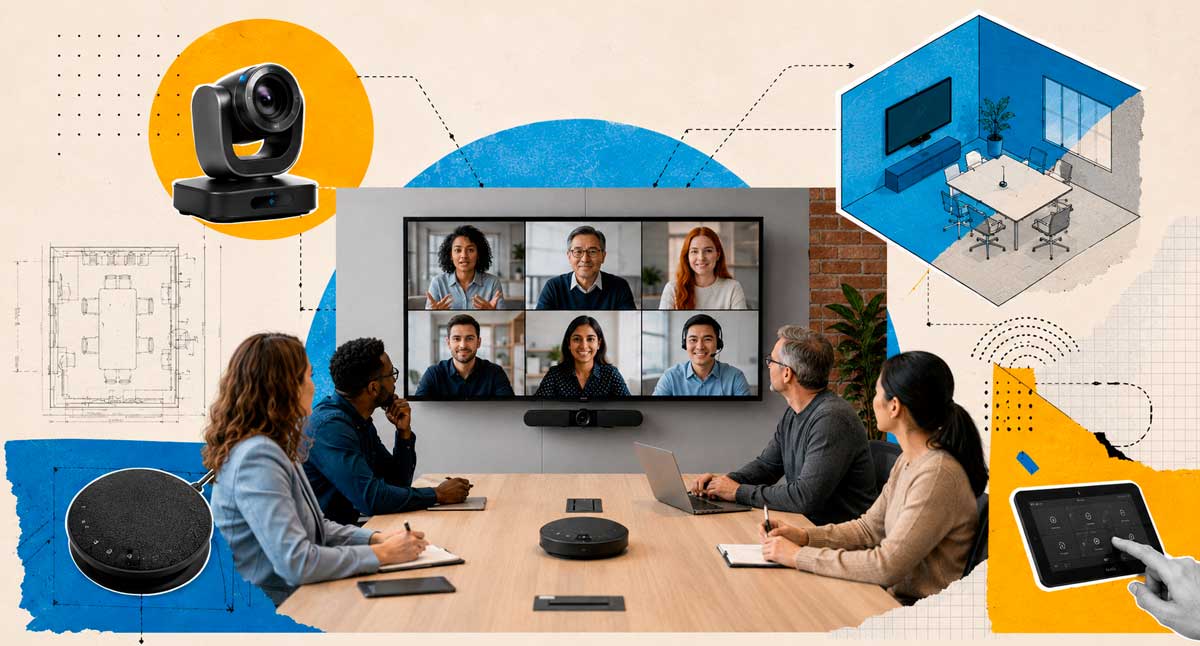
A professional video conferencing room is an environment designed for conducting virtual meetings with high-quality audio, video, and content sharing.
Unlike a meeting held on a regular laptop, a professional meeting room uses specific equipment to provide a more natural and productive experience for all participants.
Furthermore, this type of environment allows for the integration of both in-person and remote teams. In this way, hybrid meetings become more efficient and collaborative.
Why invest in a video conferencing room?
Many companies believe that a webcam and an internet connection are sufficient. However, this approach often leads to problems that directly impact productivity.
Furthermore, meetings with technical glitches can convey an unprofessional image to clients, partners, and suppliers.
Among the main benefits are:
- Better audio and video quality;
- Greater professionalism in meetings;
- Cost reduction related to travel;
- Integration between in-person and remote teams;
- Increased productivity and collaboration;
- Better experience for customers and partners.
In this way, the company reduces interruptions and makes better use of employees’ time.
The main components of a video conferencing room.
Professional camera
The camera is one of the most important elements in the room.
Currently, there are solutions with advanced features, such as:
- Automatic participant placement;
- Voice tracking;
- Smart zoom;
- Full HD or 4K resolution.
Thus, the experience becomes more dynamic and communication between participants improves.
Audio system
Poor audio can completely ruin a meeting.
Therefore, it is essential to invest in:
- High-sensitivity microphones;
- Noise cancellation;
- Echo reduction;
- Uniform sound capture throughout the room.
In many cases, audio has an even greater impact than image quality. After all, a conversation that is difficult to understand compromises the entire meeting.
Screen or display
The screen size should be compatible with the environment.
Some options include:
- Corporate TVs;
- Professional monitors;
- Video walls;
- High-resolution projectors.
In this way, all participants can clearly view presentations, reports, and other shared content.
Video conferencing system
The chosen platform must meet the company’s needs.
Among the most commonly used are:
- Microsoft Teams;
- Zoom;
- Google Meet;
- Cisco Webex.
Furthermore, the integration between hardware and software is essential to ensure a smooth and uninterrupted experience.
The importance of acoustics
Many companies invest in modern equipment, but ignore the acoustics of the room.
However, even the best equipment can perform poorly when installed in unsuitable environments.
As a result, problems arise such as:
- Eco;
- Reverberation;
- Difficulty in understanding;
- Excessive noise.
Therefore, it is recommended to use:
- Folders;
- Acoustic panels;
- Curtains;
- Sound-absorbing coatings.
Consequently, the quality of the meetings improves significantly, and participants are able to communicate more clearly.
Lighting: a detail that makes all the difference.
Lighting directly influences the quality of the transmitted image.
For this reason, it should be considered from the earliest stages of the project.
Some good practices include:
- Prioritize front lighting;
- Avoid windows behind the participants;
- Use uniform lighting;
- Reduce excessive shadows.
This way, the participants appear more clearly and the meeting conveys a more professional image.
How to plan small, medium, and large rooms.
Each environment has specific characteristics. Therefore, the choice of equipment should consider the size of the room and the number of participants.
small rooms
Suitable for up to 6 people.
Recommended:
- Compact camera;
- Integrated microphone;
- Fabric from 55″ to 65″.
Medium-sized rooms
Suitable for 6 to 12 people.
Recommended:
- Camera with intelligent framing;
- Dedicated microphones;
- Fabric from 65″ to 75″.
Large rooms
Suitable for more than 12 people.
Recommended:
- Advanced cameras;
- Distributed audio system;
- Multiple screens;
- Centralized control.
In this way, all participants can participate in the meeting comfortably and with quality.
Hybrid meetings: the new corporate standard
Currently, many companies operate on a hybrid model.
In this scenario, the biggest challenge is ensuring that remote participants have the same experience as in-person participants.
For this to happen, the room must offer:
- Uniform audio;
- Good video capture;
- Quick content sharing;
- Integration with corporate platforms.
Consequently, engagement increases and meetings become more productive.
Furthermore, remote employees are becoming more actively involved in discussions and decisions.
📌 READ ALSO:Videoconferencing: Transforming Corporate Customer Service
Common mistakes when setting up a video conferencing room
Many companies make mistakes that jeopardize their investment.
The most common ones are:
- Choosing equipment that is unsuitable for the size of the room;
- Ignore acoustics;
- Using inadequate lighting;
- Relying solely on the laptop’s webcam;
- Not performing periodic tests;
- Not having access to specialized support.
On the other hand, a well-planned project reduces errors and significantly improves the user experience.
How can BHead help?
Designing a video conferencing room goes far beyond choosing equipment.
First of all, it is necessary to carefully assess the company’s environment and needs.
Furthermore, each organization has specific challenges that must be considered during the project.
That’s why having experts on your side makes all the difference.
BHead specializes in the implementation of corporate video conferencing rooms, offering consulting, design, installation, and expert support.
In this way, your company can count on more productive, professional, and efficient meetings, regardless of the size of the operation.
💡 Want to transform your corporate meetings?
BHead can help your company design a video conferencing room tailored to your needs.
Contact us through our WhatsApp: (11) 4210-1774