
How to set up a professional video conferencing room.
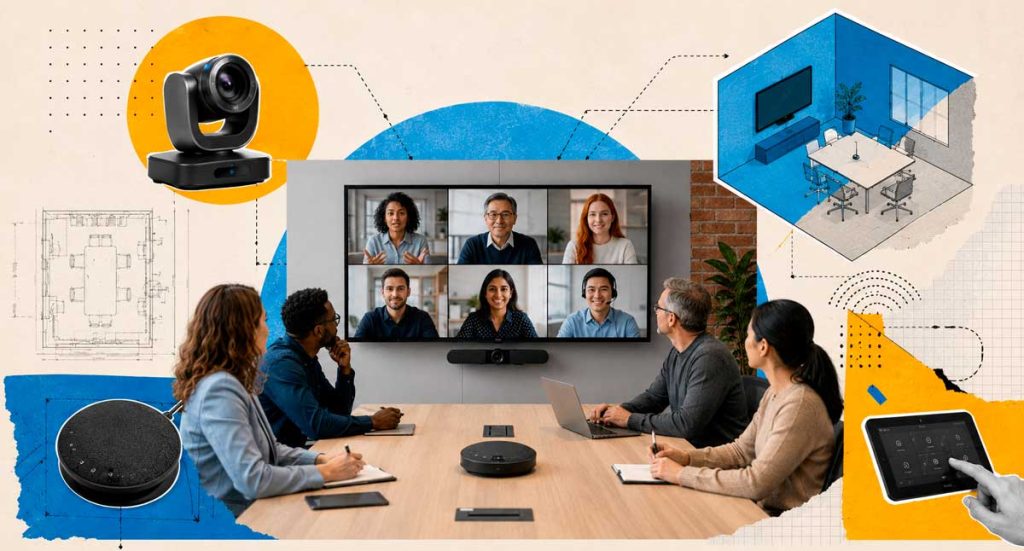
Virtual meetings have become part of the routine for companies. However, many organizations still face problems such as poor audio, low-quality images, connection failures, and difficulties in interaction between in-person and remote participants. Therefore, investing in a professional video conferencing room is no longer a differentiator but a necessity for companies seeking productivity, collaboration, and more efficient communication. In this comprehensive guide, you will understand the main components of a video conferencing room, how to plan the environment, and what precautions to take to ensure high-quality meetings. What is a professional video conferencing room? A professional video conferencing room is an environment designed for conducting virtual meetings with high-quality audio, video, and content sharing. Unlike a meeting held on a regular laptop, a professional meeting room uses specific equipment to provide a more natural and productive experience for all participants. Furthermore, this type of environment allows for the integration of both in-person and remote teams. In this way, hybrid meetings become more efficient and collaborative. Why invest in a video conferencing room? Many companies believe that a webcam and an internet connection are sufficient. However, this approach often leads to problems that directly impact productivity. Furthermore, meetings with technical glitches can convey an unprofessional image to clients, partners, and suppliers. Among the main benefits are: In this way, the company reduces interruptions and makes better use of employees’ time. The main components of a video conferencing room. Professional camera The camera is one of the most important elements in the room. Currently, there are solutions with advanced features, such as: Thus, the experience becomes more dynamic and communication between participants improves. Audio system Poor audio can completely ruin a meeting. Therefore, it is essential to invest in: In many cases, audio has an even greater impact than image quality. After all, a conversation that is difficult to understand compromises the entire meeting. Screen or display The screen size should be compatible with the environment. Some options include: In this way, all participants can clearly view presentations, reports, and other shared content. Video conferencing system The chosen platform must meet the company’s needs. Among the most commonly used are: Furthermore, the integration between hardware and software is essential to ensure a smooth and uninterrupted experience. The importance of acoustics Many companies invest in modern equipment, but ignore the acoustics of the room. However, even the best equipment can perform poorly when installed in unsuitable environments. As a result, problems arise such as: Therefore, it is recommended to use: Consequently, the quality of the meetings improves significantly, and participants are able to communicate more clearly. Lighting: a detail that makes all the difference. Lighting directly influences the quality of the transmitted image. For this reason, it should be considered from the earliest stages of the project. Some good practices include: This way, the participants appear more clearly and the meeting conveys a more professional image. How to plan small, medium, and large rooms. Each environment has specific characteristics. Therefore, the choice of equipment should consider the size of the room and the number of participants. small rooms Suitable for up to 6 people. Recommended: Medium-sized rooms Suitable for 6 to 12 people. Recommended: Large rooms Suitable for more than 12 people. Recommended: In this way, all participants can participate in the meeting comfortably and with quality. Hybrid meetings: the new corporate standard Currently, many companies operate on a hybrid model. In this scenario, the biggest challenge is ensuring that remote participants have the same experience as in-person participants. For this to happen, the room must offer: Consequently, engagement increases and meetings become more productive. Furthermore, remote employees are becoming more actively involved in discussions and decisions. 📌 READ ALSO:Videoconferencing: Transforming Corporate Customer Service Common mistakes when setting up a video conferencing room Many companies make mistakes that jeopardize their investment. The most common ones are: On the other hand, a well-planned project reduces errors and significantly improves the user experience. How can BHead help? Designing a video conferencing room goes far beyond choosing equipment. First of all, it is necessary to carefully assess the company’s environment and needs. Furthermore, each organization has specific challenges that must be considered during the project. That’s why having experts on your side makes all the difference. BHead specializes in the implementation of corporate video conferencing rooms, offering consulting, design, installation, and expert support. In this way, your company can count on more productive, professional, and efficient meetings, regardless of the size of the operation. 💡 Want to transform your corporate meetings? BHead can help your company design a video conferencing room tailored to your needs. Contact us through our WhatsApp: (11) 4210-1774
Automation for video conferencing rooms: main possibilities
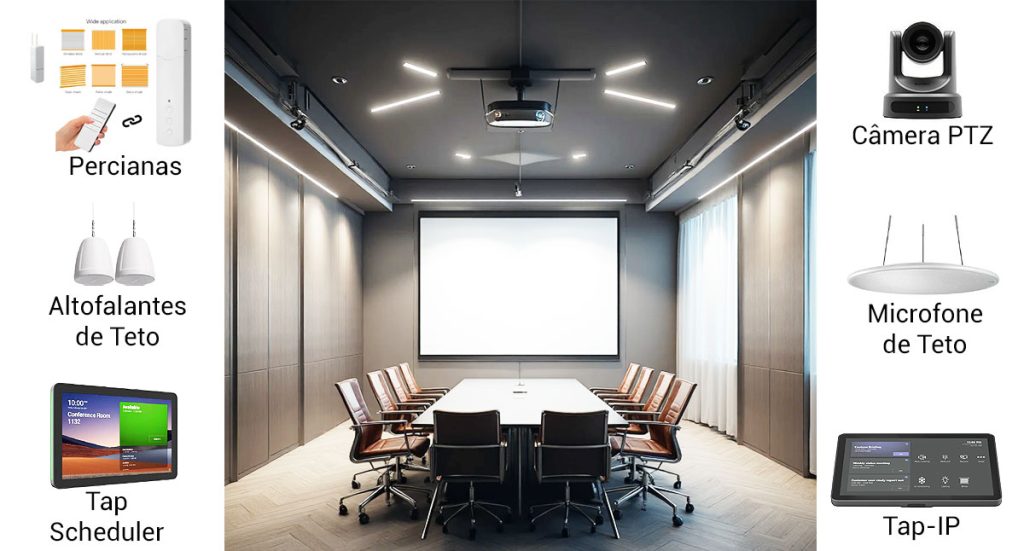
Automation in video conferencing rooms has become essential for companies that want to improve the experience of their teams and clients. With increasingly advanced solutions, it’s possible to integrate lighting, climate control, blinds, projection, and even the physical layout of the room, creating a much more efficient environment. Furthermore, an automated room offers greater convenience, speed, and professionalism in daily operations. Why automate a video conferencing room? First of all, it’s worth highlighting that automation ensures faster operations and avoids interruptions during important meetings. When everything is working in an integrated way, the user focuses only on the meeting content, while the system takes care of the rest. As a result, the company gains productivity and projects a more modern and organized image. 1. Lighting automation: intelligent switching on and off. Lighting is one of the first features to be automated. Although it seems simple, it makes a big difference in the quality of the video conference. It is possible to: This automation ensures visual comfort and improves video capture, especially when combined with PTZ cameras and professional microphones. 2. Air conditioning automation: always the ideal temperature. Another important point is climate control. Meetings are often disrupted because the room is too hot or too cold. To avoid this, automation allows: Consequently, the environment becomes more comfortable and efficient, reducing energy waste. 3. Automated blinds: light and privacy control Automated blinds help control the amount of natural light and ensure privacy during strategic meetings. Furthermore, they can operate in sync with lighting and videoconferencing equipment. Among the possibilities are: This integration contributes to a more professional visual experience. 📌 READ ALSO:Professional video conferencing: essential for modern businesses 4. Modular room: intelligently dividing or combining spaces. Many companies have rooms that can be divided for smaller meetings or combined for larger events. These are called…modular rooms With automation, this process becomes much simpler and safer. When the partition is installed or removed, the system can automatically identify the room configuration and adjust all features. Thus: This feature eliminates manual adjustments and prevents errors during important meetings. 5. Automation of projectors, screens and cameras In addition to structural elements, automation also ensures that all audiovisual equipment operates in sync. This makes it possible to: This brings agility and reduces operational errors. 6. Centralized control: everything in a single panel. Perhaps the greatest advantage of automation is unified control. Instead of multiple remote controls, the user accesses everything through: As a result, the environment becomes extremely intuitive, even for people who are not familiar with technology. Conclusion Automation in video conferencing rooms offers numerous possibilities that enhance the efficiency and professionalism of corporate meetings. Furthermore, intelligent integrations between lighting, air conditioning, blinds, projectors, and partitions make any environment more dynamic and prepared for different types of use. With these solutions, companies ensure practicality, cost savings, and a superior experience for all participants. 💡 Want to improve your living room? Contact BHead via WhatsApp and receive personalized guidance.
Professional video conferencing: essential for modern businesses
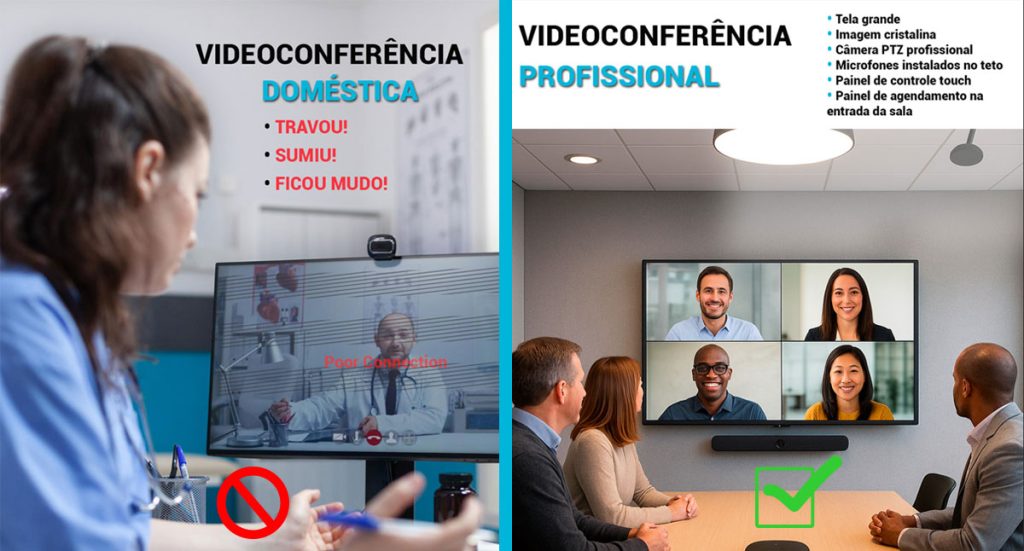
The corporate routine has changed rapidly in recent years. Although many companies started by using home solutions for online meetings, the truth is that these no longer meet the needs of the corporate environment. Furthermore, when communication breaks down, the image becomes blurry, or the audio fails, the entire team loses time—and productivity. Therefore, investing in professional video conferencing It has become indispensable for organizations seeking quality, efficiency, and truly clear communication. When homemade solutions become a problem. It’s common for some companies to start operations using simple webcams, makeshift microphones, and free applications. However, this type of setup rarely sustains the pace of more important meetings. In addition, home-based solutions often feature: These factors, taken together, convey an image of unprofessionalism, even when the company offers excellent services. 📌 READ ALSO: Videoconferencing Transforming Corporate Customer Service What changes with professional videoconferencing? A professional video conferencing It completely transforms the meeting experience. The equipment is designed to deliver consistent quality, even over long periods. Furthermore, the professional systems automatically optimize sound, focus, and framing, allowing everyone to participate without distractions. Among the main distinguishing features, the following stand out: 1. Clean audio and intelligent pickup Tabletop or ceiling microphones pick up only the voice, reducing echo and noise. In this way, each participant is heard clearly. 2. Sharp image and autofocus Equipment such as PTZ cameras or collaboration bars adjust the focus as the person speaks. This way, everyone remains visible without the need for manual adjustments. 3. Stable connection and automatic optimization. Professional systems use advanced network compression and prioritization protocols, which maintain quality even in fluctuating scenarios. 4. Integrated Experience Instead of multiple separate devices, everything functions as a single ecosystem. Therefore, operation is simple and efficient. Direct impact on the company’s image. In addition to technical improvements, theprofessional video conferencingIt generates immediate credibility. After all, well-structured meetings demonstrate organization, preparation, and attention to detail. Consequently, customers, suppliers, and partners begin to view the company with greater confidence. Meeting rooms that actually work. A room equipped with the right systems provides a seamless experience. Furthermore, technologies such as smart cameras, ceiling microphones, and control panels make them intuitive to use, even for those who have never encountered this type of solution before. The end result is simple: enter the room, touch a panel, and start a high-quality meeting. Why are so many companies migrating to professional systems? The adoption of professional video conferencing It grew because organizations realized that: Furthermore, a single compromised meeting can cost far more than the investment in a reliable system. BHead transforms meeting rooms into smart environments. BHead implements complete corporate communication solutions, always prioritizing audio, image, and connectivity quality. Furthermore, each project is configured to meet the specific needs of each client. 💡 If your company wants to improve the meeting experience and ensure a professional standard, the Head She is ready to help.
5 Tips for Setting Up an Efficient Video Conferencing Room
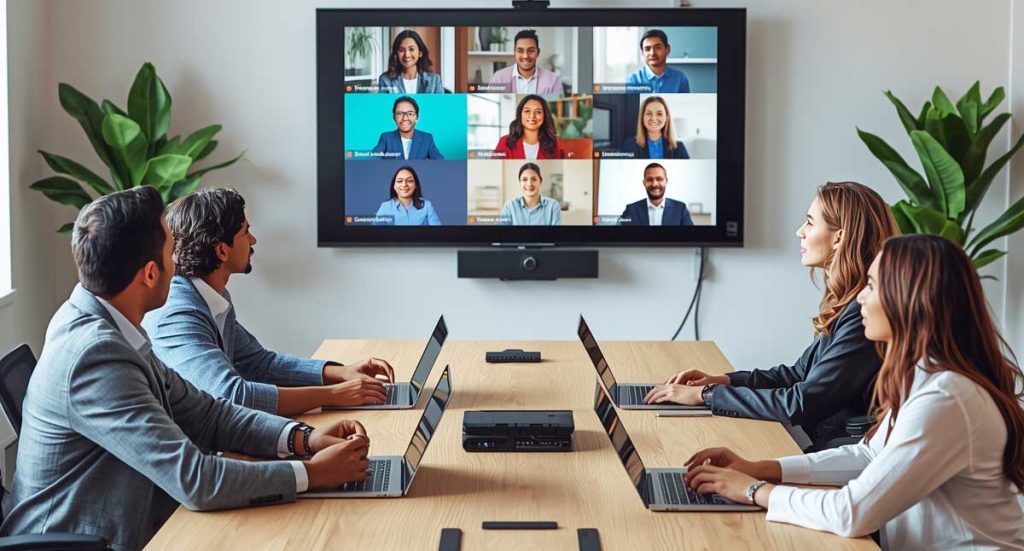
Video conferencing rooms have become indispensable for companies that value productivity, agility, and good communication. In the modern corporate environment, investing in the right infrastructure makes all the difference. After all, a smooth meeting conveys professionalism and avoids wasting time. In this article, you will discoverHow to set up an efficient video conferencing room.The following tips help ensure sound quality, image quality, and comfort for all participants. 1. Choose the right environment. The first step is to choose a quiet space with good lighting. Environments isolated from external noise are ideal. Additionally, avoid places with a lot of echo, as this impairs the clarity of communication. Take advantage of natural light whenever possible. However, use curtains or blinds to control glare. This way, the camera maintains good visibility and the framing is more pleasing. 📌 Extra tip:Walls with acoustic paneling or carpets help reduce echo and make speech clearer. This significantly improves the experience for those participating in the meeting. 2. Invest in quality audio. Audio is the heart of any video conference. Noise or feedback disrupts the entire conversation. Therefore, choose carefully.table, lapel or ceiling microphonesof good quality. In addition, pair the microphone with speakers that distribute sound evenly. This way, everyone can hear clearly, even from a distance. 💡 Whenever possible, use systems withNoise cancellationanddirectional pickupThus, the focus remains on the participants’ voices and unwanted sounds are minimized. Therefore, the meeting becomes much more productive. 📌 READ ALSO: Videoconferencing Transforming Corporate Service 3. Use cameras with good resolution and framing. The image also conveys professionalism and credibility. Therefore, invest in a Full HD camera or higher. Models with a wide-angle lens are ideal, as they frame all participants in a balanced way. Avoid cameras with highly sensitive autofocus. They can cause distortions during movement and impair the visual experience. Also, try to keep the lens clean to ensure a sharp image. 📌 Extra tip:Keep the camera at eye level. This creates a sense of closeness and makes meetings more natural and engaging. 4. Ensure a stable connection and compatible equipment. Even the best equipment doesn’t work well with an unstable internet connection. Therefore, whenever possible, usewired networkIt offers more stability than Wi-Fi and reduces connection failures. In addition, keep all devices updated. Camera, microphone, and software need to be compatible with each other. Otherwise, crashes and glitches may occur during meetings. 💡 Tools like Microsoft Teams, Zoom, and Google Meet work best when your hardware meets their technical requirements. Therefore, always check the recommended settings for each platform before starting a video conference. 5. Consider the comfort and experience of the participants. An efficient video conferencing room also needs to be comfortable. Ergonomic chairs, a table at the correct height, and good ventilation make all the difference. Furthermore, the environment should be pleasant for everyone, especially during long meetings. The layout of the space also has a significant influence. A central table, with participants facing the camera, facilitates eye contact and improves interaction. In this way, the conversation flows more naturally. 📌 Extra tip:Personalize the background of the room with the company’s visual identity. This way, the brand stands out and conveys a more professional and organized image. Setting up an efficient video conferencing room doesn’t require a huge investment. However, careful planning of every detail is essential. By following these five tips, your company guarantees…more productive meetings, clearer communicationand amodern and trustworthy corporate image.Furthermore, your employees will feel more comfortable expressing themselves and participating in conversations, which strengthens teamwork. 📌 Need help setting up a modern and functional video conferencing room?A HeadWe specialize in IT solutions for businesses and can help you design the ideal environment for your business — with high performance, stability, and professional quality. 👉 Talk to the BHead team on WhatsApp.and discover how to transform your meetings into truly effective experiences.
Best Video Conferencing Platforms for Business in 2025
Digital communication has become indispensable for companies of all sizes. In 2025, video conferencing platforms for businesses have gained even more relevance, offering advanced features, integration with corporate tools, and security guarantees. Furthermore, with the rise of hybrid work, choosing the right solution is no longer just a matter of convenience: it’s now a matter of competitiveness. Why invest in video conferencing platforms in 2025? Adopting a modern video conferencing solution means much more than holding online meetings. These platforms allow you to integrate global teams, reduce travel costs, and optimize productivity. Furthermore, in 2025, artificial intelligence began to support the process, offering real-time translations, automatic summaries, and participant engagement analysis. Therefore, investing in a quality tool can generate immediate and sustainable results. The top video conferencing platforms for businesses in 2025 Zoom: A benchmark in usability Zoom remains one of the most popular options. It stands out for its intuitive interface, stable calls, and collaboration features such as breakout rooms and integration with project management tools. Furthermore, the platform continues to evolve rapidly. Microsoft Teams: Full Integration with Microsoft 365 Microsoft Teams is ideal for companies already using the Microsoft 365 suite. In 2025, Teams introduced even more AI features, such as virtual assistants that help organize meetings and generate automatic minutes. This strengthens productivity and streamlines the routines of large organizations. Google Meet: Simplicity and Accessibility Google Meet has evolved and now offers advanced encryption and subtitles in multiple languages. Its main advantage remains its integration with Google Workspace, which facilitates adoption by companies already using Gmail, Drive, and Calendar. Furthermore, the tool’s simplicity makes the implementation process quick and accessible. Cisco Webex: Focus on Corporate Security Cisco Webex has always been a strong player in the corporate segment, especially in large companies. In 2025, it offers advanced administrative control features and robust security solutions. Therefore, it becomes a differentiator in sectors that handle sensitive data and cannot afford to take risks. Zoom AI Companion and New Trends In addition to established platforms, new features like Zoom AI Companion are transforming the meeting experience. This tool summarizes conversations, suggests actions, and helps managers maintain high levels of productivity. Meanwhile, other emerging solutions leverage augmented reality and holography to create even more immersive meetings. 📌 READ ALSO: 💡 Videoconferencing: Transforming Corporate Service How to choose the best videoconferencing platform for your company? The decision should consider factors such as: Security: authentication and encryption features. Scalability: the ability to serve from small teams to large corporate events. Integrations: Connect with internal systems, CRM, and collaboration tools. Cost-benefit: Evaluate licenses, packages, and additional features. Therefore, before investing, it’s essential to map out your team’s needs. Then, compare the available solutions and determine which of the top video conferencing platforms for businesses in 2025 offers the best fit for your business. Conclusion Video conferencing platforms for businesses in 2025 are not just communication tools, but strategic solutions that directly impact productivity, security, and collaboration. Furthermore, when chosen well, they ensure more efficient meetings and strengthen your organization’s digital culture. Therefore, investing in the right platform means being prepared for the future of work. 👉 Contact BHead via our 📱 WhatsApp and discover the best solution 💡 for your business 🚀
Videoconferencing Transforming Corporate Service
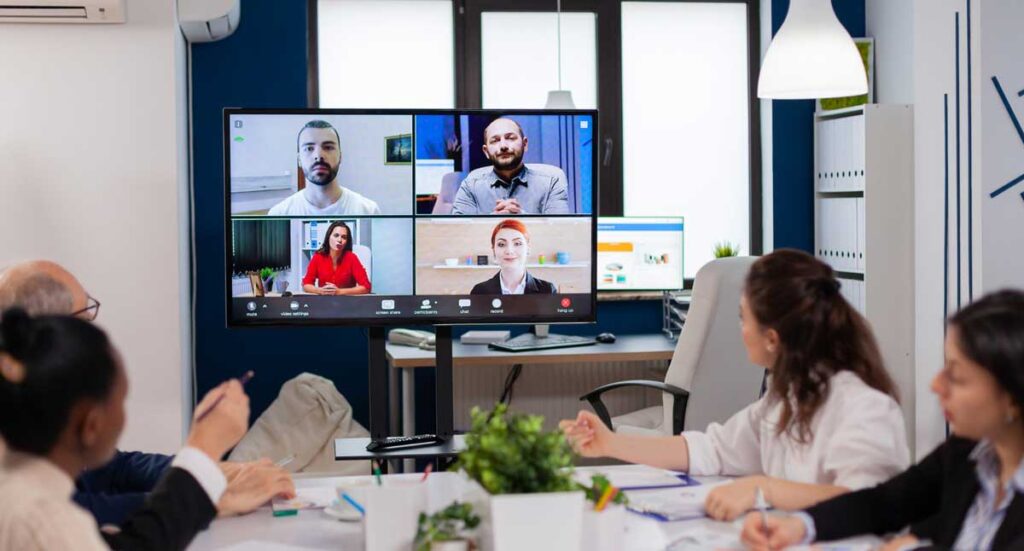
In an increasingly digital world, videoconferencing is no longer just an alternative. In fact, it has become a strategic necessity for companies that want to remain competitive. In Brazil, this transformation has been especially noticeable in organizations that value agility, quality service, and cost reduction—the cornerstones of the services offered by BHead. Why has videoconferencing become essential? With the rise of remote work and hybrid models, many companies have faced the challenge of keeping their teams connected efficiently. Therefore, videoconferencing has emerged as one of the most practical and comprehensive solutions. Among the main benefits of videoconferencing, we can highlight: Real-time communication with professional quality Reduced travel and logistics costs More objective and productive meetings Greater control and security in corporate interactions Furthermore, it has also proven effective in training, technical support, sales presentations, and customer support. In other words, it is a versatile tool that serves different areas of the company. Post-Implementation Video Conferencing Support: The BHead Difference Companies that adopt video conferencing systems often face problems shortly after installation. However, a lack of ongoing support can compromise the entire operation. This is precisely where BHead stands out in the market. Our support offers: Specialized technical support Preventive and corrective maintenance Personalized training for your company’s team Remote and in-person support, as needed This way, we ensure not only the technology’s functionality, but also its maximum efficiency. As a result, your company achieves better performance with much greater confidence. Technology that connects and generates results When choosing BHead, your company doesn’t just invest in modern equipment. In fact, it acquires complete solutions, developed by experts who understand the demands of the Brazilian corporate environment. Furthermore, our technical team is highly qualified to deliver customized video conferencing projects, with fast installation, a secure structure, and ongoing support. Read also: Technology Outsourcing for Healthcare and Other Sectors Want to transform your company’s communication? Contact BHead and see how video conferencing can become a strategic tool for your business. 👉 Talk to BHead now
Smart office: understand the trend

Offices are changing. And, contrary to what many people think, this change isn’t just aesthetic. With technological advancements, companies are transforming traditional spaces into smart offices, more efficient and adapted to the new reality of work. In this article, you’ll understand how this transformation is happening, why it’s important, and what your company can do to keep up with this evolution. What defines a smart office? Objectively, a smart office is a corporate environment that uses technology to facilitate tasks, improve the team experience, and reduce operating costs. In other words, everything is designed to function more efficiently. Furthermore, these environments offer greater comfort, security, and flexibility. This is possible because they rely on automation, smart sensors, video conferencing systems, and other interconnected solutions. 5 solutions that make the environment smarter Now that you understand the concept, let’s look at the resources behind this transformation. See below the main technologies used by companies adopting the smart office model. As a result, the environment adapts as needed, without waste. Remote communication is already part of the routine of many companies. However, not all offices are prepared for it. With modern video conferencing systems, meetings flow better and technical issues practically disappear. Consequently, productivity increases. Security has also evolved. Instead of badges or paper lists, many companies use biometrics, QR codes, or facial recognition. This ensures tighter control and fewer errors when accessing the building or specific rooms. Furthermore, the process is faster. Also read: Videoconferencing: Transforming Corporate Service Another important point is meeting rooms. They can be booked through apps, with control over features such as lighting, sound, and audiovisual equipment. This drastically reduces meeting preparation time. Finally, data analysis helps managers make more assertive decisions. Monitoring which spaces are most used, for example, allows for strategic layout reconfiguration. This way, the company optimizes the use of every square meter. Real Benefits of the Smart Office Now that you’ve seen the main solutions, it’s time to understand the results. Investing in technology for the corporate environment brings several benefits: Reduced energy, maintenance, and travel costs; Greater comfort and well-being for the team; A modern and updated corporate image; Safer and more organized environments. Furthermore, smart offices help attract talent, as they demonstrate that the company values innovation and quality of work life. Ready to transform your work environment? Implementing these technologies can seem complex. However, with the right partner, everything becomes easier. BHead specializes in corporate technology solutions, including video conferencing, automation, and IT infrastructure. Our team is ready to create a custom project for your company. 📲 Want to know how to transform your office? Contact BHead on WhatsApp:👉 Click here to chat with a specialist
Corporate Technology Trends to Watch

The corporate technology landscape is constantly changing. Therefore, for companies that want to remain competitive and efficient, keeping up with the latest innovations is no longer an option—it’s become a necessity. With this in mind, BHead has prepared an analysis of the main corporate technology trends to keep an eye on. If your company is seeking modernization, reduced operational costs, and increased security, continue reading to the end. Each trend can directly impact the future of your business. Generative Artificial Intelligence in Customer Service and Support Generative AI has gone from being just a curiosity to becoming a strategic resource. Companies are currently using advanced chatbots to automate customer service, resolve technical issues, and even generate customized reports. Furthermore, AI helps increase the productivity of IT teams. As a result, it helps provide faster and more accurate responses to customers, thus improving the end-to-end experience. Broadcast-Quality Video Conferencing Infrastructure With hybrid work becoming more prevalent, many companies are investing in video conferencing rooms with professional broadcast technology. PTZ cameras, noise-canceling microphones, and integrated control panels make meetings clearer and more productive. In other words, more than simply connecting people, it’s important to ensure image and sound quality, especially in critical meetings with clients or partners. Therefore, investing in adequate infrastructure is essential. 📌 Read also: Link and Equipment Monitoring: Ensure the Stability of Your IT Infrastructure Cybersecurity with Zero Trust Access Digital security has never been more essential. The “Zero Trust” model has become standard in many companies. This means that no user or device is trusted by default, even within the corporate network. In other words, this approach protects against intrusions, data leaks, and unauthorized access, especially in environments with multiple devices and remote users. Important: This trend requires reviewing access policies and implementing strong authentication solutions. Otherwise, the company runs serious security risks. IT as a Service (ITaaS): Strategic Outsourcing Increasingly, companies are outsourcing their IT to specialized partners. This not only reduces costs with payroll, hardware upgrades, and ongoing training, but also ensures access to an experienced and constantly updated technical team. Furthermore, the ITaaS model allows internal IT to act more strategically, leaving operational routines in the hands of specialists. Consequently, managers can focus on innovation and results. ESG and Technology: Sustainable Innovation Companies are adopting technological practices aligned with ESG (environmental, social, and governance) pillars. This includes everything from reducing energy consumption in data centers to IT solutions focused on digital inclusion and accessibility. Therefore, technology and sustainability go hand in hand — and the market values companies that demonstrate this concern. After all, innovation also means considering long-term impact. Corporate technology trends for 2025 point to a scenario where automation, security, communication quality, and sustainability are essential. Therefore, companies that keep up with these changes don’t just stand out—they lead. If your organization wants to stay ahead of these transformations, talk to BHead. Our experts are ready to create the ideal solution for your business. 👉 Contact us via WhatsApp now!
SigmaOne Experience Center Opening
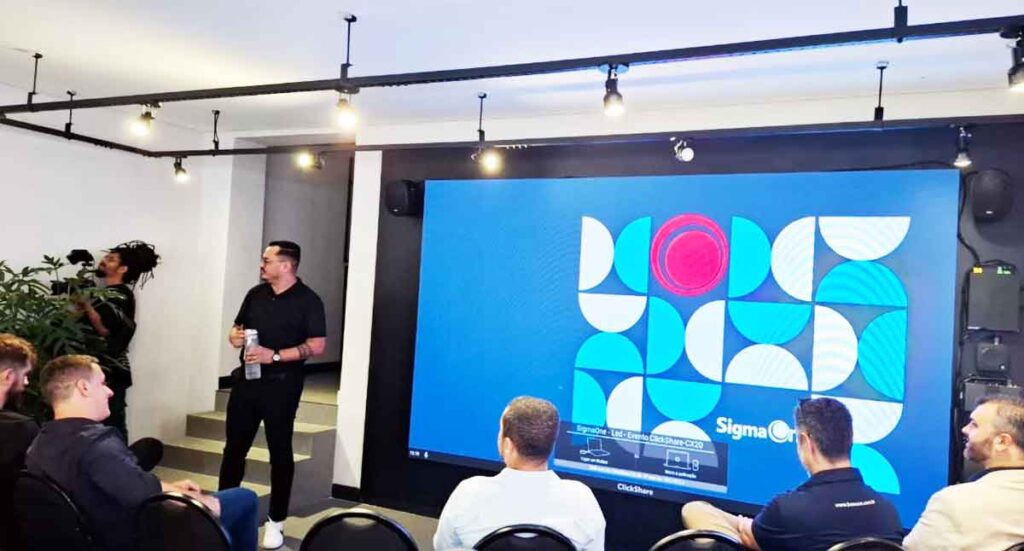
In early April, BHead was one of the companies invited to the inauguration of SigmaOne ‘s new Experience Center . The event marked an important step in the world of corporate collaboration, showcasing innovative videoconferencing and smart environments, and offering a cocktail reception for all attendees. Presentation of videoconferencing rooms SigmaOne Experience Center facilities . In total, more than 12 rooms were displayed , each equipped with solutions from leading brands such as Lenovo, Logitech, Jabra , Microsoft , and others. Discover some of the rooms: Signature Room – High-end Microsoft experience Signature Meeting Room is designed to deliver an immersive collaboration experience. It also integrates cutting-edge technologies to deliver highly productive and engaging meetings. Items included: In this way , the Signature Room guarantees flawless communication, efficient connectivity and high-standard meetings. 📌 Read also: Logitech Rally Bar: Professional Video Conferencing Solution Educational Room – Technology at the service of teaching Designed for more dynamic learning, the Educational Room provides an interactive environment with high-quality audio and video. This allows instructors and students to explore new ways of teaching and learning. Items included: On top of all this , this structure promotes intelligent collaboration and immersive learning. Presidential Office – Strategic decisions with high technology Designed for high-level meetings, the President’s Room combines sophistication and efficiency. It ‘s ideal for executive meetings, impactful presentations, and brainstorming sessions. Items included: Therefore , this environment ensures clarity in communication and agility in decisions. Logitech Room – Integration and Productivity Logitech Room was created for agile meetings, with solutions that prioritize simplicity and quality. As a result , the equipment integrates easily, facilitating daily use by a variety of professionals. Items included: Lenovo Room – Intelligence in collaboration Finally, the Lenovo Room relies on modern solutions that facilitate space management and content sharing. Furthermore , it delivers a fluid and practical experience for all participants. Items included: With this , the Lenovo Room guarantees more organized meetings, with optimized control and interaction.
Logitech Rally Bar: Professional Video Conferencing Solution
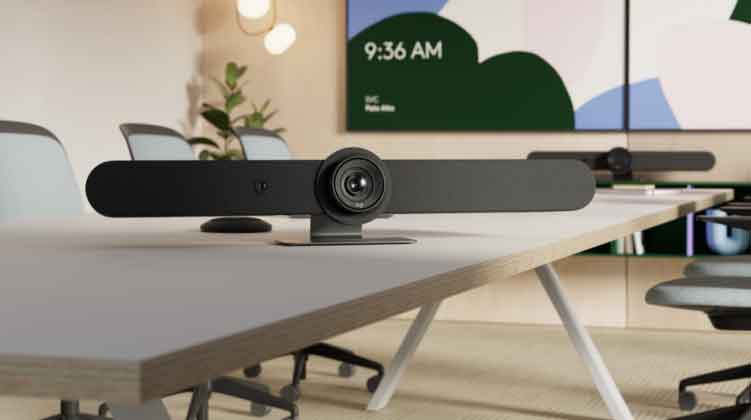
Logitech Rally Bar: The Ultimate Solution for Professional Video Conferencing With the rise of hybrid and remote work, the need for high-quality video conferencing solutions has never been more essential. That’s why Logitech, a global leader in communication technology, developed the Rally Bar line, designed to deliver excellent audio and video in meeting rooms of all sizes. In this article, we’ll explore the key differences and benefits of these cameras for companies and professionals seeking the best video conferencing experience. The Logitech Rally Bar is an advanced video conferencing bar that combines a camera, microphone, and speakers into a single device, providing a complete solution for virtual meetings. It’s also available in different versions, including the Rally Bar and Rally Bar Mini, each adapted to suit different space sizes. Its main differences 1. 4K Ultra HD picture quality Provides resolution4K Ultra HDwith automatic framing technology. This means all participants are visible on the call, even if they move around during the meeting. 2. Crystal clear audio with RightSound technology Logitech’s audio capture system is designed to reduce unwanted noise and focus on the speaker’s voice. This results in clear, natural sound. Additionally, advanced microphones offer extended range, making communication even more effective. 3. Artificial intelligence and automation With technologyRightSightRally Bar uses artificial intelligence to detect participants and automatically adjust zoom and framing. This ensures a dynamic and professional experience in any meeting. 4. Compatibility with major platforms It is compatible with popular platforms such asZoom, Microsoft Teams, Google Meetand other videoconferencing solutions. This allows for quick and easy integration with the company’s work environment. 5. Easy installation and connectivity Its design allows for simplified installation, with wall, table, or mobile stand mounting options. Furthermore, connectivity is versatile, supporting USB Plug & Play connections or standalone mode without the need for a PC. 📌 Read also:Hybrid Videoconferencing Rooms Rally Bar vs. Rally Bar Mini: Which to Choose? Logitech offers two main versions: Is it worth investing in this solution? If your company is looking for a solutionprofessional, reliable and high qualityFor video conferencing, the Logitech Rally Bar is a solid choice. With advanced image, audio, and automation features, it ensures more productive and professional meetings, regardless of location. Video conferencing technology has evolved, and Logitechis at the forefront of this transformation. So, invest in quality and efficiency for your meetings and take your business communication to a new level! Finally, theBEADis a partner of Logitechand designs all video conferencing rooms for your company. Contact us now for a no-obligation consultation. WhatsApp! Images: https://www.logitech.com