
How to Plan IT Scalability for Growing Businesses

A company’s growth is always good news. However, when theIT infrastructure If this evolution fails, bottlenecks arise that compromise productivity, safety, and even the customer experience. Therefore,planning IT scalabilityIt’s no longer an option; it’s become a strategic necessity. Throughout this article, you will understand what scalability in IT is, what the main challenges faced by expanding companies are, and, most importantly, how to structure an efficient plan for sustainable growth. What is scalability in IT? Scalability in IT is the ability of the technological infrastructure to…grow or adapt As demand increases, without loss of performance, security, or stability. In other words, it’s about preparing systems, networks, and processes to support more users, more data, and more operations. Furthermore, scalable IT allows the company to grow without having to rebuild the entire structure at each new stage. In this way, growth becomes predictable, controlled, and more financially efficient. Why is scalability critical for growing businesses? Expanding companies face constant change. New employees, new customers, new units, and more data circulating daily. However, when IT is not prepared, recurring problems arise. Among the main negative impacts, we can highlight: On the other hand, when scalability is planned from the outset, IT ceases to be an obstacle and begins to act as a…a growth engine for the business. Key challenges when scaling IT Before discussing solutions, it’s important to understand the most common challenges faced by companies. Rigid infrastructure Old or poorly planned environments tend to be inflexible. As a result, any increase in demand requires large investments or complex changes. Lack of visibility Without proper monitoring, it’s difficult to predict bottlenecks. Therefore, problems only become apparent when they are already impacting operations. Uncontrolled growth When IT grows without planning, makeshift solutions emerge. Over time, this creates confusing, insecure, and difficult-to-maintain environments. Security compromised. As a company grows, so does its attack surface. Therefore, without a clear security strategy, the risks multiply. 📌 READ ALSO:Proactive network monitoring: what it is and why your company needs it. How to plan IT scalability in practice. Now that the challenges are clear, let’s get down to what really matters: How to plan IT scalability efficiently.. Assess the company’s current situation. The first step is to understand where the company is. To do this, it is essential to map: Based on this analysis, it becomes much easier to identify limitations and opportunities for improvement. Align IT with business objectives. Scalability should not be considered solely from a technical standpoint. On the contrary, it needs to be fully aligned with the company’s goals. For example, if the plan is to double the number of customers, IT needs to support that growth without compromising performance. Therefore, planning should always consider the future of the business. Invest in flexible and modular solutions. Modular solutions facilitate expansion as needed. Instead of major changes, it’s possible to grow gradually. Furthermore, technologies such as virtualization and hybrid environments allow for greater cost control and better use of existing resources. Prioritize monitoring and proactive management. A scalable IT system needs to be constantly monitored. This way, bottlenecks can be identified before they affect operations. With the right tools, the IT team can act proactively, ensuring greater stability and predictability. Strengthen security from the start. As infrastructure grows, security needs to evolve along with it. Therefore, access policies, network segmentation, backups, and user control should be part of the planning from the very beginning. Thus, the company grows without increasing its exposure to risk. The role of outsourcing in IT growth. For many companies, maintaining a highly specialized in-house team may not be feasible. In this scenario, theIT outsourcingIt emerges as a strategic solution. With a specialized partner, it is possible to: Furthermore, the company gains more time to focus on what really matters: its core business. Scalability is not a cost, it’s an investment. Many companies still view IT planning as an expense. However, a lack of scalability often leads to much higher costs in the medium and long term. When IT is well-planned, growth happens in an organized, secure, and sustainable way. As a result, the company gains operational efficiency, improves customer experience, and positions itself better in the market. Count on BHead to plan your IT growth. A Head We act strategically to help companies structure, modernize, and scale their IT infrastructure securely and efficiently. From diagnosis to ongoing management, our team works to ensure that technology keeps pace with your business growth. If you want to grow without surprises and without technological bottlenecks, talk to BHead and find out how we can help.
On-demand IT outsourcing: when is it worth hiring one-off services?

A on-demand IT outsourcingThis has become an increasingly strategic alternative for companies that need specialized technical support but do not wish to maintain a fixed and costly structure. Instead of long and inflexible contracts, this model allows them to hire…one-off IT services, exactly when the need arises.In this way, the company gains agility, reduces costs, and maintains stable operations, even in scenarios of high demand or specific projects. What is on-demand IT outsourcing? On-demand IT outsourcing involves hiring a specialized company to perform…specific technology activities, without the need for an ongoing contract or a dedicated full-time team.In other words, the service is activated as needed, whether to solve a critical problem, support a project, or complement the internal team. Furthermore, this model is ideal for companies that already have a minimum IT infrastructure, but need…advanced technical expertiseat certain times. When is on-demand IT outsourcing worth it? 1. One-off, short-term projects In many cases, the company needs to execute specific projects, such as: In these situations, maintaining an in-house professional solely for this project is not feasible. Therefore, on-demand outsourcing becomes the most efficient solution. 2. Lack of internal technical expertise Even with an in-house IT team, it’s common for not all specialties to be available. Therefore, by contracting specific services, the company gains access to…highly qualified professionals, without needing to invest in lengthy training programs or complex hiring processes. Furthermore, this technical support reduces errors and speeds up project delivery. 3. Emergency situations and critical failures Problems such as server outages, security breaches, or network instability requirequick and accurate response.In this context, on-demand IT outsourcing allows for the immediate activation of specialists, minimizing operational and financial impacts. Consequently, the company avoids prolonged downtime and losses to the business. 📌 Read also: The 7 Biggest Benefits of IT Outsourcing for Associations 4. Cost control and financial predictability Unlike complete outsourcing, point-in-time services allow you to pay only for what you use. This makes costs more predictable and aligned with the company’s reality. Furthermore, this model avoids high fixed costs, making it ideal for growing companies or those experiencing seasonal fluctuations. 5. Support during periods of high demand. During periods of expansion, audits, implementations, or internal changes, the demand for IT tends to increase.In this scenario, on-demand outsourcing functions as astrategic reinforcementensuring that the internal team does not become overwhelmed. Main IT services contracted on demand Among the most common services in this model, the following stand out: In this way, the company maintains a secure and functional infrastructure, even without a fixed contract. On-demand outsourcing vs. full outsourcing Although both are efficient, each model meets different needs.While full outsourcing takes over all IT management, on-demand outsourcing is suitable for companies that want…Flexibility, control, and agility.. Therefore, the ideal choice depends on the stage of the business, technological maturity, and available budget. Conclusion A on-demand IT outsourcingIt is a strategic solution for companies that need reliable technical support without compromising their budget on fixed infrastructure.Furthermore, this model offers flexibility, access to experts, and speed in resolving critical problems. If your company is looking for efficiency, security, and cost control, hiring one-off IT services might be exactly what you need right now. 📞 Talk to BHead Do you want to understand if on-demand IT outsourcing makes sense for your business?Contact BHead and talk to our time especializado para uma avaliação personalizada da sua infraestrutura.
Proactive network monitoring: what it is and why your company needs it.

Maintaining a stable corporate network is essential for productivity, security, and business continuity. However, many companies still adopt a reactive approach, only acting when the problem has already impacted users and systems.In this scenario, the proactive network monitoring It emerges as a fundamental strategy for companies that want to avoid failures, reduce risks, and ensure consistent performance of their IT infrastructure. Throughout this article, you will understand what proactive monitoring is, how it works, and, most importantly, why your company needs to adopt it. What is proactive network monitoring? The proactive network monitoringI t is a set of practices and tools that monitor, in real time, the performance, availability, and security of network assets, such as servers, switches, firewalls, internet links, and connected devices. Unlike the reactive model, in which the IT team only acts after a failure occurs, proactive monitoring allows…Identify anomalies before they become critical problems. Therefore, it is possible to act preventively, avoiding interruptions and impacts to the business. Furthermore, this type of monitoring provides continuous data that assists in decision-making and infrastructure planning. How does proactive monitoring work in practice? In general, proactive monitoring uses specialized software that collects network information 24 hours a day. These systems analyze important metrics and trigger automatic alerts whenever something deviates from the expected pattern. Among the main points monitored, the following stand out: In this way, the IT team can act quickly, ofteneven before the user notices any instability.. 📌 READ ALSO: IT Infrastructure: Common Mistakes Why is proactive monitoring essential for businesses? Currently, the network is the foundation of virtually all corporate operations. Therefore, any failure can lead to financial losses, decreased productivity, and even damage to the company’s reputation. Below are the main reasons to invest in proactive monitoring. Reducing downtime By identifying bottlenecks and failures at an early stage, proactive monitoring significantly reduces the risk of unexpected outages. As a result, critical systems remain available for longer. Increased productivity When the network is functioning correctly, employees can perform their tasks without interruption. Consequently, the time spent on emergency calls decreases, and the IT team can operate more strategically. Greater security for the IT environment. Continuous monitoring helps detect abnormal behavior, unauthorized access, and potential attack attempts. This gives the company an extra layer of protection for its data and systems. Planning and scalability With historical data and detailed reports, it becomes easier to plan upgrades, expansions, and infrastructure investments. In this way, IT ceases to be merely operational and begins to act in a preventive and strategic manner. Reactive monitoring vs. proactive monitoring: what’s the difference? Although both deal with network infrastructure, the difference between them is significant. No reactive monitoringHowever, action is only taken after the failure. This means that users are already being impacted, and the damage has often already occurred. On the other hand, theproactive monitoringIt anticipates problems, allowing for quick and planned corrections. In this way, the company avoids emergencies, reduces costs, and improves the quality of its IT services. Which companies should adopt proactive monitoring? In practice, all companies that rely on IT They benefit from proactive monitoring. However, it is even more suitable for organizations that: Regardless of size, adopting this model means more control and fewer surprises in daily life. How BHead can help your company. A Headoperates with complete solutions forIT infrastructure and managementWe offer proactive monitoring tailored to the needs of each business. Using the right tools and expert support, we help your company maintain a stable, secure network that’s ready for growth. Furthermore, our focus is prevent problems ensuring that IT functions as strategic support and not as an operational bottleneck. 📌 Want to know how to implement proactive monitoring in your company?💡 Get in touch withHead And speak with our team of IT experts.
IT Audit: How to Prepare Your Company

Preparing the company for an IT audit is an essential step to ensure security, compliance, and operational stability. HoweverHowever, many organizations still view this process merely as a one-off obligation.In practiceHowever, auditing should be part of routine technology management. FurthermoreWhen preparation is done in a structured way, the company can identify risks, correct flaws, and optimize resources in advance.For this reasonUnderstanding how to prepare correctly makes all the difference in avoiding critical remarks and ensuring peace of mind during the assessment. What is an IT audit? IT auditing is a structured process that assesses whether a company’s technological resources are aligned with best practices, security standards, and legal requirements.Generally speakingShe analyzes not only the infrastructure, but also the internal processes and controls. Among the main points evaluatedAmong the highlights are: Like thisThe goal is not only to identify flaws, but also to validate whether IT supports the business in an efficient, secure, and sustainable way. Why is preparing in advance essential? Although some companies leave this preparation until the last minute, acting in advance brings clear advantages.Firstly, avoids unexpected operational interruptions.FurthermoreThis allows for correcting nonconformities more calmly and at a lower cost. ConsequentlyThe outcome of the audit tends to be more positive.Another important pointThe fact is that proper preparation demonstrates technological maturity, something that is increasingly valued by clients, partners, and investors today. Essential checklist for IT auditing. Below, you’ll find a practical and organized checklist to help you prepare your company efficiently. 1. Updated IT documentation First and foremost, it is essential that all documentation is organized and up-to-date.This includes, for example: Without this documentary basisHowever, audits tend to reveal flaws even when the infrastructure is adequate.ThereforeKeeping these records up to date is essential. 2. Access control and permissions Next, carefully review access to critical systems and resources.In that regardCheck if: It is worth noting thatThis point is often one of the most sensitive during audits, precisely because it involves direct risks to information security. 3. Information security Security must be treated as a priority.That’s whyPlease evaluate carefully: FurthermoreIt is essential to have clear incident response procedures in place, because without them, the impact of an attack can be much greater. 📌 READ ALSO: Why investing in digital security and antivirus software is essential for any company. 4. Backup and disaster recovery Another critical item is ensuring that the data is protected.For thatIt is important: OtherwiseEven with backups, a company can face serious failures at the very moment it most needs to recover information. 5. Infrastructure and performance In addition to security, it is also important to assess whether the infrastructure supports the company’s current operations.In this context, analysis: That wayThe audit will not identify risks related to system unavailability or poor performance. 6. Operational processes and routines In addition to the technology itself, the processes are also audited.That’s whyCheck if: When processes are well definedThe operation becomes more predictable, efficient, and reliable. 7. Compliance and best practices Finally, assess whether the IT department follows standards and best practices applicable to its segment.This includesFor example, legal requirements, safety standards, and internal guidelines. Like thisThe company demonstrates a commitment to governance and technological responsibility. Common mistakes when preparing for an IT audit. Even with good intentions, some companies make recurring mistakes.Among the most common, they are: Avoid these pointsTherefore, it already puts the company in a much safer position. How can BHead help in this process? BHead provides comprehensive support for IT audit preparation.In that regardIt offers technical diagnostics, document organization, security review, and infrastructure adjustments. In this wayBy doing so, your company not only passes the audit, but also raises its level of technological maturity. Conclusion Preparing your company for an IT audit doesn’t have to be complicated.With organizationWith well-defined processes and a secure infrastructure, it is possible to transform this moment into an opportunity for continuous improvement. ThereforeThe sooner this preparation begins, the lower the risks and the greater the benefits for the business. 💡 Do you need technical support? Talk to the BHead team and request a complete IT diagnosis.
Automation for video conferencing rooms: main possibilities
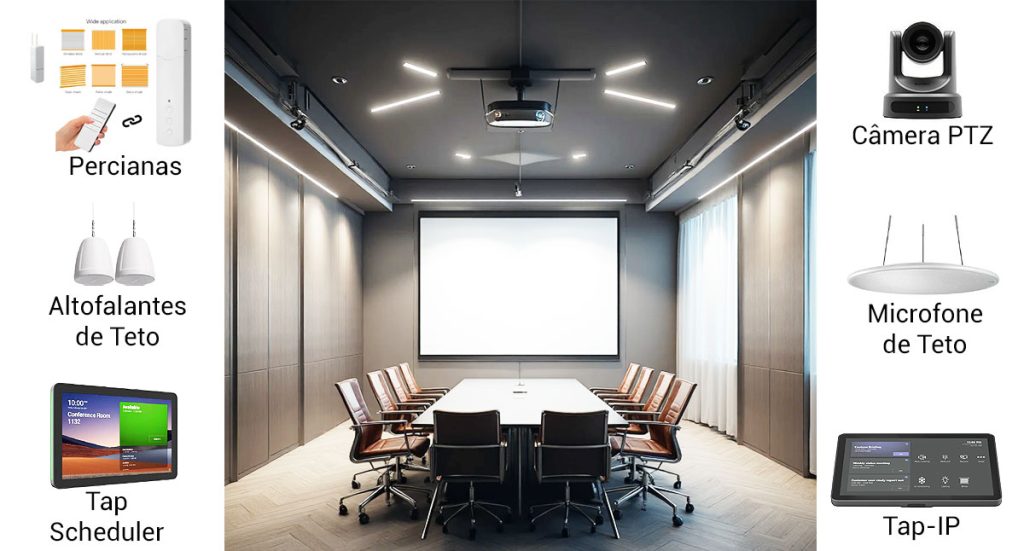
Automation in video conferencing rooms has become essential for companies that want to improve the experience of their teams and clients. With increasingly advanced solutions, it’s possible to integrate lighting, climate control, blinds, projection, and even the physical layout of the room, creating a much more efficient environment. Furthermore, an automated room offers greater convenience, speed, and professionalism in daily operations. Why automate a video conferencing room? First of all, it’s worth highlighting that automation ensures faster operations and avoids interruptions during important meetings. When everything is working in an integrated way, the user focuses only on the meeting content, while the system takes care of the rest. As a result, the company gains productivity and projects a more modern and organized image. 1. Lighting automation: intelligent switching on and off. Lighting is one of the first features to be automated. Although it seems simple, it makes a big difference in the quality of the video conference. It is possible to: This automation ensures visual comfort and improves video capture, especially when combined with PTZ cameras and professional microphones. 2. Air conditioning automation: always the ideal temperature. Another important point is climate control. Meetings are often disrupted because the room is too hot or too cold. To avoid this, automation allows: Consequently, the environment becomes more comfortable and efficient, reducing energy waste. 3. Automated blinds: light and privacy control Automated blinds help control the amount of natural light and ensure privacy during strategic meetings. Furthermore, they can operate in sync with lighting and videoconferencing equipment. Among the possibilities are: This integration contributes to a more professional visual experience. 📌 READ ALSO:Professional video conferencing: essential for modern businesses 4. Modular room: intelligently dividing or combining spaces. Many companies have rooms that can be divided for smaller meetings or combined for larger events. These are called…modular rooms With automation, this process becomes much simpler and safer. When the partition is installed or removed, the system can automatically identify the room configuration and adjust all features. Thus: This feature eliminates manual adjustments and prevents errors during important meetings. 5. Automation of projectors, screens and cameras In addition to structural elements, automation also ensures that all audiovisual equipment operates in sync. This makes it possible to: This brings agility and reduces operational errors. 6. Centralized control: everything in a single panel. Perhaps the greatest advantage of automation is unified control. Instead of multiple remote controls, the user accesses everything through: As a result, the environment becomes extremely intuitive, even for people who are not familiar with technology. Conclusion Automation in video conferencing rooms offers numerous possibilities that enhance the efficiency and professionalism of corporate meetings. Furthermore, intelligent integrations between lighting, air conditioning, blinds, projectors, and partitions make any environment more dynamic and prepared for different types of use. With these solutions, companies ensure practicality, cost savings, and a superior experience for all participants. 💡 Want to improve your living room? Contact BHead via WhatsApp and receive personalized guidance.
Why investing in digital security and antivirus software is essential for any company.
Digital security and antivirus software play a crucial role in protecting modern businesses. Given that cyberattacks are becoming increasingly sophisticated and frequent, while many organizations use basic protection tools, there is still a significant difference between “having an antivirus installed” and having a truly efficient infrastructure. Furthermore, cyberattacks are becoming increasingly sophisticated. Today, attackers use advanced methods such as targeted phishing, social engineering, hidden malware, and rapidly spreading ransomware. Therefore, adopting a more comprehensive approach that goes beyond the use of basic antivirus software is essential. How digital threats affect businesses First of all, it’s important to note that digital threats don’t discriminate based on company size. Small businesses are often prioritized targets precisely because they have fewer layers of protection. Therefore, a simple click on a fake link can have a significant impact on operations. Among the main risks are: This shows that protection goes far beyond simply avoiding viruses. It involves integrated strategies to ensure that the entire infrastructure is prepared to face increasingly frequent attacks. Why professional antivirus software makes a difference. Although there are several free options on the market, it’s crucial to understand that a professional antivirus offers advanced features that make all the difference in a corporate environment. In addition to detecting malware in real time, these solutions have additional layers of protection that prevent unauthorized access and monitor the behavior of suspicious programs. Consequently, the company gains more security, stability, and control over its digital assets.Another important point is that the professional versions allow you to manage all computers from a central panel, ensuring quick responses in case of incidents. Digital security beyond antivirus. Even with a good antivirus, it’s still necessary to strengthen the rest of the infrastructure. Therefore, it’s recommended to adopt complementary strategies, such as: When these solutions work together, the risk of incidents decreases significantly. Furthermore, the company gains greater predictability and peace of mind regarding its digital operations. The importance of safe behavior in everyday life. Despite all the tools available, employee behavior remains one of the most important lines of defense. Therefore, investing in awareness and best practices is essential.Ultimately, many attacks only happen because the attacker exploits human vulnerabilities, such as opening suspicious attachments, sharing passwords, or accessing untrusted websites. In this way, when the team understands the risks and learns to identify dangerous situations, the overall level of protection naturally increases. How can BHead help? BHead works with complete digital security solutions for companies that want robust, efficient, and modern protection. Our services range from initial consulting to the implementation of professional tools, ensuring that each environment is protected according to its specific needs. Whether through corporate antivirus software, advanced firewalls, or comprehensive monitoring strategies, we help your organization keep its data secure and its operations running smoothly and reliably. 📌 READ ALSO 💬 Contact us via WhatsApp Do you need to strengthen your company’s digital security? Talk to BHeadand receive expert guidance.
Professional video conferencing: essential for modern businesses
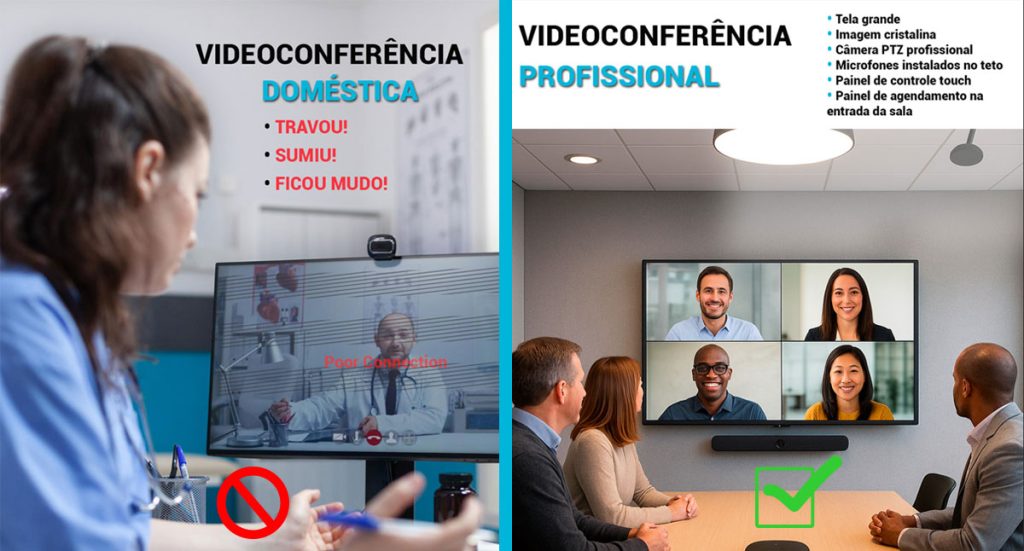
The corporate routine has changed rapidly in recent years. Although many companies started by using home solutions for online meetings, the truth is that these no longer meet the needs of the corporate environment. Furthermore, when communication breaks down, the image becomes blurry, or the audio fails, the entire team loses time—and productivity. Therefore, investing in professional video conferencing It has become indispensable for organizations seeking quality, efficiency, and truly clear communication. When homemade solutions become a problem. It’s common for some companies to start operations using simple webcams, makeshift microphones, and free applications. However, this type of setup rarely sustains the pace of more important meetings. In addition, home-based solutions often feature: These factors, taken together, convey an image of unprofessionalism, even when the company offers excellent services. 📌 READ ALSO: Videoconferencing Transforming Corporate Customer Service What changes with professional videoconferencing? A professional video conferencing It completely transforms the meeting experience. The equipment is designed to deliver consistent quality, even over long periods. Furthermore, the professional systems automatically optimize sound, focus, and framing, allowing everyone to participate without distractions. Among the main distinguishing features, the following stand out: 1. Clean audio and intelligent pickup Tabletop or ceiling microphones pick up only the voice, reducing echo and noise. In this way, each participant is heard clearly. 2. Sharp image and autofocus Equipment such as PTZ cameras or collaboration bars adjust the focus as the person speaks. This way, everyone remains visible without the need for manual adjustments. 3. Stable connection and automatic optimization. Professional systems use advanced network compression and prioritization protocols, which maintain quality even in fluctuating scenarios. 4. Integrated Experience Instead of multiple separate devices, everything functions as a single ecosystem. Therefore, operation is simple and efficient. Direct impact on the company’s image. In addition to technical improvements, theprofessional video conferencingIt generates immediate credibility. After all, well-structured meetings demonstrate organization, preparation, and attention to detail. Consequently, customers, suppliers, and partners begin to view the company with greater confidence. Meeting rooms that actually work. A room equipped with the right systems provides a seamless experience. Furthermore, technologies such as smart cameras, ceiling microphones, and control panels make them intuitive to use, even for those who have never encountered this type of solution before. The end result is simple: enter the room, touch a panel, and start a high-quality meeting. Why are so many companies migrating to professional systems? The adoption of professional video conferencing It grew because organizations realized that: Furthermore, a single compromised meeting can cost far more than the investment in a reliable system. BHead transforms meeting rooms into smart environments. BHead implements complete corporate communication solutions, always prioritizing audio, image, and connectivity quality. Furthermore, each project is configured to meet the specific needs of each client. 💡 If your company wants to improve the meeting experience and ensure a professional standard, the Head She is ready to help.
Corporate network instability: understand the impact and how to resolve it.

A company’s routine depends on a stable network. However, just one instability is enough to bring everything to a halt: the system becomes unresponsive, the internet goes down, and productivity plummets. Although it seems like a simple technical problem, instability in the corporate network It directly affects the performance and credibility of any business. Often, these failures are treated as mere “occasional glitches.” However, behind them lie bottlenecks that compromise operations and can generate silent losses over time. The impact of an unstable network When the network fails, the whole company feels it.Employees waste time waiting for reconnections, files fail to sync, and online meetings are interrupted. Over time, this turns into a cycle of unproductivity that affects results and deadlines. Furthermore, it is important to remember thatUnstable networks increase the risk of vulnerabilities.In many cases, backup systems fail to function correctly, creating opportunities for data loss. Therefore, maintaining a stable network infrastructure is fundamental not only for productivity but also for information security. How to identify and solve the problem Solving instabilities requires a technical and strategic vision.Next, see how to restore network performance and prevent recurring failures: 📌 Read also: 5 IT Problems That Can Stop Your Business (And How to Avoid Them) Good practices for maintaining stability After fixing the problem, the focus should be on prevention.With a well-structured maintenance plan, the network remains stable and the digital environment more secure. To achieve this: With these measures, the company reduces the risk of unexpected shutdowns and ensures greater efficiency in daily operations. Stability is synonymous with productivity. Instability in a corporate network goes far beyond slow Wi-Fi. It affects people, processes, and results. Therefore, investing in a reliable network is not an additional cost, but a…strategic decision to ensure continuity and competitiveness. Companies that constantly monitor their network are able to operate with predictability, reduce costs, and improve the experience for customers and employees. 💡 Dica BHead: If your company is experiencing slow speeds, connection failures, or constant outages, don’t wait for the problem to escalate.📌 Talk to the BHead team We conduct comprehensive diagnostics and identify exactly what is causing the instability before it affects your business performance.
5 Tips for Setting Up an Efficient Video Conferencing Room

Video conferencing rooms have become indispensable for companies that value productivity, agility, and good communication. In the modern corporate environment, investing in the right infrastructure makes all the difference. After all, a smooth meeting conveys professionalism and avoids wasting time. In this article, you will discoverHow to set up an efficient video conferencing room.The following tips help ensure sound quality, image quality, and comfort for all participants. 1. Choose the right environment. The first step is to choose a quiet space with good lighting. Environments isolated from external noise are ideal. Additionally, avoid places with a lot of echo, as this impairs the clarity of communication. Take advantage of natural light whenever possible. However, use curtains or blinds to control glare. This way, the camera maintains good visibility and the framing is more pleasing. 📌 Extra tip:Walls with acoustic paneling or carpets help reduce echo and make speech clearer. This significantly improves the experience for those participating in the meeting. 2. Invest in quality audio. Audio is the heart of any video conference. Noise or feedback disrupts the entire conversation. Therefore, choose carefully.table, lapel or ceiling microphonesof good quality. In addition, pair the microphone with speakers that distribute sound evenly. This way, everyone can hear clearly, even from a distance. 💡 Whenever possible, use systems withNoise cancellationanddirectional pickupThus, the focus remains on the participants’ voices and unwanted sounds are minimized. Therefore, the meeting becomes much more productive. 📌 READ ALSO: Videoconferencing Transforming Corporate Service 3. Use cameras with good resolution and framing. The image also conveys professionalism and credibility. Therefore, invest in a Full HD camera or higher. Models with a wide-angle lens are ideal, as they frame all participants in a balanced way. Avoid cameras with highly sensitive autofocus. They can cause distortions during movement and impair the visual experience. Also, try to keep the lens clean to ensure a sharp image. 📌 Extra tip:Keep the camera at eye level. This creates a sense of closeness and makes meetings more natural and engaging. 4. Ensure a stable connection and compatible equipment. Even the best equipment doesn’t work well with an unstable internet connection. Therefore, whenever possible, usewired networkIt offers more stability than Wi-Fi and reduces connection failures. In addition, keep all devices updated. Camera, microphone, and software need to be compatible with each other. Otherwise, crashes and glitches may occur during meetings. 💡 Tools like Microsoft Teams, Zoom, and Google Meet work best when your hardware meets their technical requirements. Therefore, always check the recommended settings for each platform before starting a video conference. 5. Consider the comfort and experience of the participants. An efficient video conferencing room also needs to be comfortable. Ergonomic chairs, a table at the correct height, and good ventilation make all the difference. Furthermore, the environment should be pleasant for everyone, especially during long meetings. The layout of the space also has a significant influence. A central table, with participants facing the camera, facilitates eye contact and improves interaction. In this way, the conversation flows more naturally. 📌 Extra tip:Personalize the background of the room with the company’s visual identity. This way, the brand stands out and conveys a more professional and organized image. Setting up an efficient video conferencing room doesn’t require a huge investment. However, careful planning of every detail is essential. By following these five tips, your company guarantees…more productive meetings, clearer communicationand amodern and trustworthy corporate image.Furthermore, your employees will feel more comfortable expressing themselves and participating in conversations, which strengthens teamwork. 📌 Need help setting up a modern and functional video conferencing room?A HeadWe specialize in IT solutions for businesses and can help you design the ideal environment for your business — with high performance, stability, and professional quality. 👉 Talk to the BHead team on WhatsApp.and discover how to transform your meetings into truly effective experiences.
Healthcare IT Outsourcing in São Paulo: Efficiency and Security

The healthcare sector in São Paulo is evolving rapidly. Hospitals, clinics, and laboratories handle a massive amount of data and systems, requiring reliable technology and ongoing support.In this scenario, the IT outsourcing has become an efficient alternative to guarantee security, agility and cost reduction. Why are hospitals and clinics in São Paulo outsourcing IT? Maintaining an in-house IT infrastructure can be expensive and complex. Furthermore, the sector requires qualified professionals and high-performance equipment.For this reason, many institutions in São Paulo began to outsource IT for specialized companies. With this model, it is possible to: Furthermore, outsourcing allows managers to have more budgetary predictability and can invest in improvements to clinical infrastructure. +++ READ ALSO: IT Outsourcing for Hospitals: 5 Signs Your Hospital Needs This Solution Security and LGPD: a constant concern In the city of São Paulo, the volume of hospital data is enormous. Therefore, information security is a top priority.With the General Data Protection Law (LGPD), institutions need to adopt strict measures to protect sensitive patient information. By outsourcing IT, the hospital has constant monitoring, data encryption and controlled access policies.In addition, the partner company carries out automatic backups and regular security testing, ensuring that no data is lost or inappropriately exposed. Consequently, the risk of cyber incidents decreases and the institution’s reputation is preserved. How IT outsourcing works in practice The process is simple and adaptable. First, a IT infrastructure diagnosis of the hospital or clinic. The partner company then defines personalized action plans according to the size and needs of the institution. Among the most common services are: In this way, the hospital now hasa stable, secure and scalable technological environment, ready to accompany the growth of the operation. The health scenario in São Paulo Sao Paulo concentrates large medical centers and nationally renowned hospital networks.For this reason, investment in technology has become essential.However, keeping everything internally generates high costs and a constant demand for updates. In this context, outsourcing emerges as the ideal solution to ensure performance and continuous innovation, without overloading internal teams.Furthermore, it allows faster responses in critical situations, which is essential in hospital environments. BHead and the future of hospital IT in São Paulo A BHead Technologyacts in São Paulo and throughout the state, offering complete IT infrastructure and support solutions for hospitals, clinics and laboratories. With a specialized team and a focus on results, BHead delivers: Thus, healthcare institutions are able to operate with greater efficiency, stability and peace of mind, knowing that the technology is in good hands. Conclusion A IT outsourcing in healthcare in São Paulo is a smart choice for those looking efficiency, safety and economy.With the right partner, you can modernize processes, avoid failures, and protect critical information. 💡 Want to find out how much your clinic or hospital can save by outsourcing? 📞 Talk to BHead now on WhatsApp and receive a free assessment of your IT infrastructure.